Shopify only, for now
The popup app is currently available for Shopify stores. We're working to bring it to every platform — if you're on another platform, talk to your account manager about alternatives.
Steps
1
In your Shopify admin, go to Apps → PERCUP and open the International popup setting. Toggle it on to start detecting visitors from locations your store doesn't ship to directly. New to this? Follow the full how to install the PERCUP popup guide.
2
Customize the popup to match your brand
The popup is completely customizable — adjust the copy, colors, and imagery so it feels like a natural part of your store rather than a generic banner. A well-matched popup reads as helpful, not intrusive.
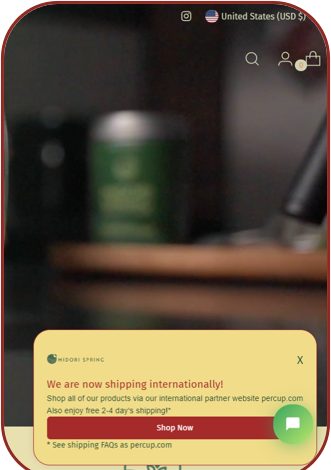
Midori Spring — popup styled to their store
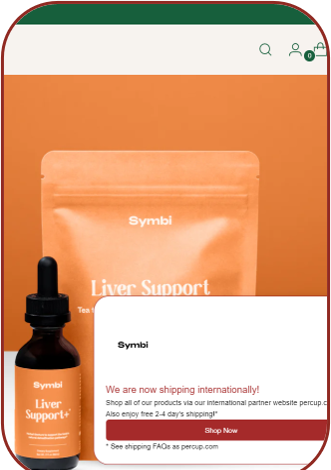
Symbi — same popup, matched to their brand
Two real examples — the popup announces worldwide shipping and sends shoppers to your PERCUP page, styled to match each store.
3
We point it to your PERCUP brand page
You don't need to configure the destination — the PERCUP team wires the popup to your brand page from our backend. Visitors are handed off to a page selling your products, so the customer journey never breaks — they simply continue shopping where delivery is available.
What you get
More visibility — international shoppers learn you now ship to them. Higher conversion — instead of a dead end, they're guided straight to a page where they can actually buy.
Need a hand?
Talk to your account manager
We'll help you set up and style the popup so it fits your store perfectly. Book a call and we'll walk you through the install, or reach out any time.